

Project management software helps small teams, large enterprises, and anyone who wants to make their work processes as efficient as possible.
One of the most effective visual tools offered by such software is an online Gantt chart. It opens up broad horizons for detailed timeline planning, taking into account all tasks, dates, resources, and assigned performers. Furthermore, managers use it to allocate resources and organize project funding.
There are different types of Gantt chart-based project management platforms. For instance, you may need open-source software, a program designed specifically for Apple, or a free solution.
How to choose the online platform that will definitely suit your team’s needs, budget, and technical infrastructure?
This article covers some smart Gantt chart-based solutions in various areas.
Let’s figure them out.
Best open-source Gantt chart software
Open-source project management systems are widely chosen for two reasons: they provide a free-to-use option and offer deep customization typically unavailable in cloud-based SaaS services.
There are some cons as well. For example, setting up and updating such programs can require essential technical skills.
Anyway, these tools are worth your attention. Below are some notable examples of this category.
Redmine
A positive reputation and a rich history of use are what characterize this open-source project management software.
Redmine was recently used to solve relatively simple issues. Teams applied it for usual task management and bug tracking.
Today, this universal solution is used by businesses across various industries as it provides basic PM functionality.
One of the program’s key features is a Gantt diagram. It allows you to manage multiple projects simultaneously without switching between different tabs or additional services.
Managers and team members can set milestones and dependencies on a timeline, as well as seamlessly communicate in real time.
OpenProject
OpenProject is also a well-known solution in the project management world.
You can use this open-source tool with a simple Gantt chart as a free, self-hosted community version or as a paid cloud service with advanced functionality.
The chart itself is valuable for its simplicity and user-friendliness.
A manager, any team member, or involved stakeholder can see the entire project or drill down into each task, viewing its dependencies and deadlines.
A quick definition of the critical path is also available here.
Now let’s move on to the next category.
Best Mac-focused Gantt chart software
Apple users don’t always have access to every app they want. Not all desired tools are compatible with macOS.
Below you’ll find solutions that are either natively designed for Mac or have fully functional versions for the Apple ecosystem.
GanttPRO
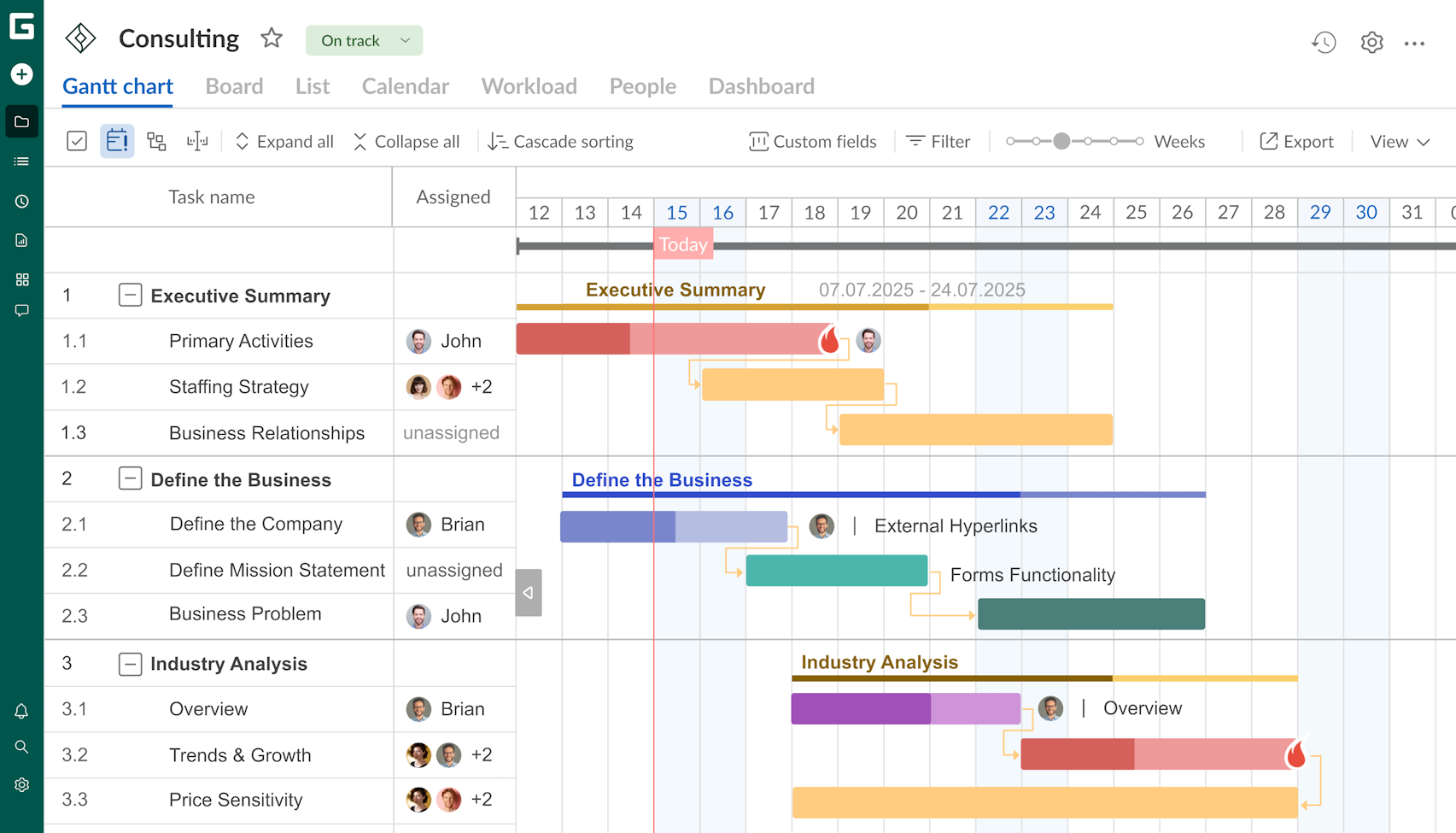
GanttPRO is widely known for its multifunctional Gantt chart for project and task planning. It works equally well in a browser on Mac, Windows, and Linux. A smart mobile app is also available.
The users of this Gantt chart maker online can seamlessly create timelines with tasks and dates, add dependencies, set smart hierarchies, highlight key milestones, and more.
They can easily track resource utilization. GanttPRO shows who is overloaded and who is available for new tasks.
The platform offers project export to popular formats and the ability to share timelines via a link with a static or dynamic display.
It supports real-time collaboration. You can try the software during the 14-day trial period.
Merlin Project
This robust project management tool also looks suitable for Mac users.
Merlin Project is a popular choice for experienced project managers who need MS Project-like functionality in a macOS version.
They benefit from a user-friendly interface designed in accordance with Apple guidelines.
A Gantt chart in Merlin Project is a tool that can be mastered in minutes. It allows you to create tasks, track time, add dependencies, allocate resources, manage finances, and more.
The program offers deep integration with calendars and reminders. Import and export capabilities are also available.
Celoxis
Let’s also include Celoxis in this list. This is a robust software tool with flexible settings and advanced functionality.
Mac users apply this program at any stage of the project lifecycle, from initiation to completion.
A Gantt chart isn’t the only project view in this tool. However, it is considered effective and reliable.
Users can easily create such a diagram and share it with external stakeholders. They actively use built-in analytics and smart reporting.
QuickPlan
This powerful service for iOS and macOS provides quick Gantt chart creation without unnecessary setup steps.
QuickPlan is suitable for teams that don’t need a heavyweight corporate system. They simply open the app, create tasks on a timeline, and drag and drop them by date. Dependencies are automatically recalculated with the slightest change.
QuickPlan is considered convenient for on-the-go planning, without being tied to a desktop. It easily syncs between devices via iCloud and allows project export.
The platform is actively used by freelancers, agencies, and small teams.
There are other interesting solutions in this category, but it’s time to move on to the next one.
Best free Gantt chart software
Teams that don’t have enough budget to fully utilize paid software can easily find a free project management solution with an effective Gantt diagram.
Alternatively, it’s possible to find a program with a freemium model. Its basic functionality will be free, but advanced features will only be available with paid plans.
Ganttile
This is a reliable project management solution with a simple interface and free features.
Users especially appreciate a simple yet powerful Gantt chart in this program.
Ganttile is typically used by small teams involved in software development or marketing. However, companies and individuals from other industries also often rely on this project management solution.
The program allows for seamless exporting. It makes it easy to share data with clients or colleagues without barriers.
Freedcamp
Choose Freedcamp if you need a reliable visual project management assistant without unnecessary, cumbersome features and the risk of errors.
This free online solution offers convenient file storage and an unlimited number of users per project.
The free version of the program provides access to many basic features. However, a Gantt chart is only available with a paid subscription.
The advantage is that you can try it out for free during the trial period.
This chart provides a clear visualization of projects and tasks. Here you can mark key milestones, find the critical path, and add dependencies.
The free version also offers Kanban boards, task lists, calendars, and basic functionality for communication.
Freedcamp is suitable for teams willing to try some free features first and then pay for a Gantt chart.
That’s it.
Maximize the power of a Gantt chart by choosing reliable open-source, Mac-focused, or free programs
There’s no single online program that’s equally suitable for a small agency and a large corporation with many project portfolios.
Therefore, your choice should be based not on catchy names and ratings, but on your team’s realistic parameters and needs.
Open-source solutions are suitable for teams willing to assume server administration in exchange for full data control and no subscription.
Mac users choose either specialized native apps or convenient cross-platform PM programs that work equally well in Safari and other operating systems.
Finally, free software meets the needs of many small teams, startups, and freelancers who don’t have a large budget but are willing to use basic functionality without any advanced features.
Select the best program with a stunning Gantt chart and deliver your projects efficiently.
