

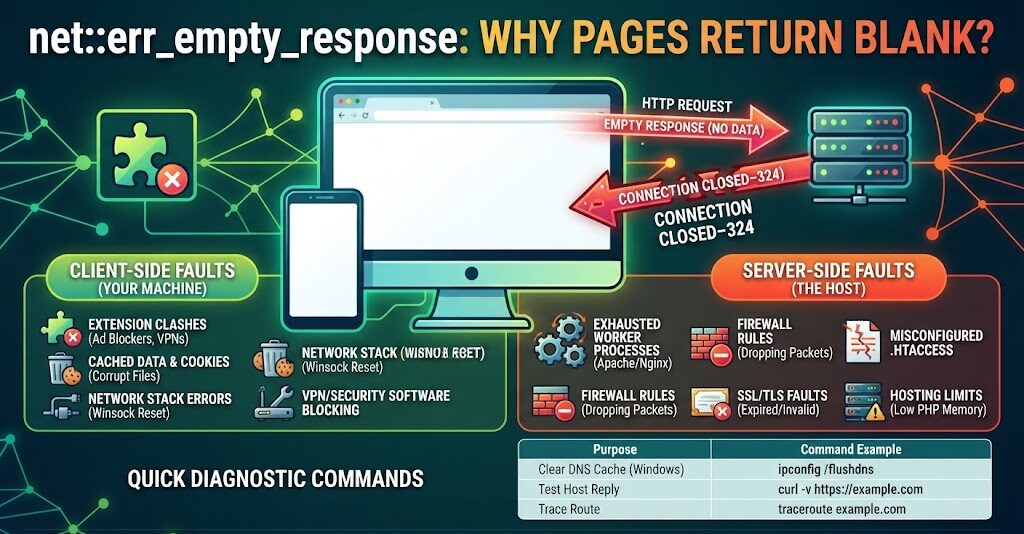
A blank page and the words net::err_empty_response mean one thing. Chrome asked a server for data and got none back. Chromium logs the failure as -324. The connection opened, then closed before anything travelled through it. The fault sits either on your device or on the host, and separating the two is the whole job.
What net::err_empty_response Means in Chrome
Chrome sends a request. The server accepts the connection, then drops it before any headers or page content return.
This is not an HTTP status code. Status codes arrive from the server once a reply starts. This code gets written by the browser when no reply starts at all.
Site owners and developers meet it more than casual visitors. Local test servers and shared hosting plans both fail this way.
Server Causes Behind net::err_empty_response
Web Server and Certificate Faults
Apache, Nginx and IIS all cut connections without sending headers when settings go wrong. Exhausted worker processes stop handling requests. Run apachectl configtest on Apache, or read the worker_connections value in nginx.conf.
Certificates produce the same silence. Expired ones, self-signed ones and missing Subject Alternative Names block the first reply outright. IIS administrators should check bindings and certificate trust first.
Firewall rules and security appliances drop packets in both directions. On office or provider hardware, allowlist the domain and retest.
Hosting Limits, Plugins and Proxy Rules
A malformed .htaccess ends requests midway. Show hidden files in cPanel File Manager to repair it. On WordPress, rename the plugins directory over FTP to rule out a faulty plugin.
Thin PHP memory or a low max_user_connections figure on a shared plan stops replies as visitor numbers climb.
Cloud setups break the same way through wrong security group entries or missing NAT mappings. Azure and AWS both log firewall rules discarding packets. Cloudflare and similar proxies sometimes never reach the origin, so switch the proxy off to test its rules.
Faults on Your Own Machine
Extension clashes explain a large share of Chrome reports. Ad blockers, VPN add-ons and security utilities either stop requests or rewrite headers.
Saved page data gets in the way too. Press Ctrl+Shift+Del on Windows, or Cmd+Shift+Delete on a Mac, and wipe cached copies along with cookies.
Stale address records aim traffic at dead IPs. Our walkthrough on Chrome name resolution failures covers that cleanup in detail.
Lines in the HOSTS file beat DNS values and steer traffic at private or invalid addresses. Test rigs hit that constantly. Windows updates also leave the network stack damaged, and netsh int ip reset plus netsh winsock reset rebuild it.
Browser Fixes for net::err_empty_response
Turn every add-on off at chrome://extensions, reload the site, then switch them back on one by one until the page breaks again. Privacy utilities clash most often, and Firefox users can compare setups against this list of browser privacy extensions.
A private window answers a different question. If the page loads there, stored files or cookies are the problem.
After that, clear browsing data fully, flush address records with system commands, move to the newest browser build, and pause antivirus software. Chrome keeps its own address log at chrome://net-internals/#dns. Disconnect any VPN client with Linux support sitting in the path before you retest.
Server Repairs to Try Next
Read the host logs for sudden halts, failed scripts and dying processes. Confirm each certificate is valid, matched to the domain, and paired with an intermediate where one is needed.
From a server shell, run curl -v https://yoursite.com. Nothing coming back means settings need mending or caps need raising. The fundamentals of Bash syntax help if those flags look unfamiliar.
On cPanel and WordPress, disable every plugin and restore a stock .htaccess. Raise PHP memory, or stretch timeout values, for heavy scripts. Clear or bypass caches held by a reverse proxy or CDN.
Deeper Fixes When Pages Still Return Blank
Drop the router MTU figure when large packets never arrive, or cycle the router power. Sign in through the default router admin address to reach those settings.
Turn QUIC and HTTP/3 off at chrome://flags/#enable-quic, then retest over HTTP/2 or HTTP/1.1.
On a VPN, change protocol or pick another server. Certain state and company networks fire TCP reset packets at VPN traffic they want to censor.
Ask your host about guards such as ModSecurity and fail2ban, both covered in our roundup of open source web application firewalls, since either will refuse an HTTP request on rules alone. Where the network card or cabling looks suspect, swap it out.
Commands for Testing net::err_empty_response
| Purpose | Command |
|---|---|
| Clear address records on Windows | ipconfig /flushdns |
| Clear address records on macOS | sudo dscacheutil -flushcache; sudo killall -HUP mDNSResponder |
| Restart Linux networking | systemctl restart NetworkManager |
| Rebuild the Windows network stack | netsh int ip reset; netsh winsock reset |
| Read a host reply | curl -v https://example.com |
| Follow the route | traceroute example.com |
Wording on Linux shifts with the daemon in use, and distributions ship different defaults, so check what is running before you copy a command.
Forum threads back up the same pattern. Cases end after a malformed .htaccess is cleared, a plan is upgraded for heavier traffic, or clashing plugins go off. Host4Geeks credits stack resets and cache wipes with settling a big share of its tickets. NameHero cleared shared hosting reports by whitelisting ModSecurity on busy days. cURL, the browser network panel and Wireshark reveal whether the trouble is local, mid route or at the host.
FAQs
What causes net::err_empty_response?
A server accepted the connection then closed it without sending data. Common triggers include exhausted worker processes, invalid certificates, firewall drops, broken .htaccess files, low PHP memory, or a browser extension blocking the request.
How do I fix ERR_EMPTY_RESPONSE in Chrome?
Disable extensions, clear cached files and cookies, flush DNS with ipconfig /flushdns, and reset the network stack using netsh commands. Test in a private window. If the page still fails, the host is at fault.
Is ERR_EMPTY_RESPONSE a server problem or a browser problem?
Either. Test the site in another browser and on a second network. Failure everywhere points at the server. Success elsewhere points at your extensions, cache, DNS records or security software.
What is Chrome error code 324?
Code -324 is the internal Chromium value for ERR_EMPTY_RESPONSE. It records that a request left the browser and no data returned. Chromium documents the code publicly in its network error list.
Does clearing cache fix ERR_EMPTY_RESPONSE?
Often, yes. Corrupt cached copies and stale cookies block requests before they reach the server. Press Ctrl+Shift+Del on Windows or Cmd+Shift+Delete on macOS, clear both, then reload the page.
