

GoboLinux
-
Available software
-
Creativity & Inventing
-
Daily Use Purposes
-
Stability & Bugs
-
Customizability
Summary
Introduces a lot of new ideas and technologies into the Linux world. Ready and intended for experienced Linux users.
There are many different Linux distributions out there. Thousands of them are designed to meet different purposes (no matter how small the difference from each one). Today, we would like to introduce GoboLinux for you.
GoboLinux is a special Linux distribution which is built from scratch. It offers an alternative filesystem hierarchy. To clarify this, we all know that the common Unix hierarchy includes directories like /usr, /bin, /etc.. But that’s not the case in GoboLinux. For example the filesystem directories here are:
/System:The system files, binaries and kernel and placed here./Programs:All programs are inserted in this directory. Each program has its own folder which contains its own settings, files and data. Multiple versions of the same program can be installed easily, because each version contains its own files sepearted from the other version./Users:The home folders for the system users (root and all others) are listed here. It’s like /home in Unix hierarchy./Data:The data folder contains information about packages and recipes needed by the system. It also includes the “Variable” folder. Which is actually /var./Mount:Mounting directory if needed. Just like normal /mnt.
From the developers point of view[ref]Myths and misconceptions about the design of GoboLinux: https://gobolinux.org/doc/articles/clueless.html [/ref], this new hierarchy is a much better design for a filesystem. It keeps everything “categorized” which allows files to be preserved in these categories easily. To maintain the backwards compatibility with Unix hierarchy, a lot of symlinks are used to point to the directories on GoboLinux. For example if you run cd /etc it will take you to /System/Settings. Thus, there’s no need to modify the applications to work on the new way of categorizing these files.
The distribution also doesn’t have a “package manager” in the means of apt or dnf. Yes, you can use the InstallPackage command in order to find a binary packaged program and install it easily on your system. But usually, you’ll have to deal with the Compile command. Compile is an automated script which allows you to grab the source code for any available application in the official repositories and build it yourself. It’s very similar to Gentoo. You have only the source code of the application, not the binary files.
There’s a lot of “design decisions discussions” in these topics. Questions like “Why the things are what they are” or “Why do they depend on the source codes” would need a lot of time to explain. Hence, we invite you to check their documentation. GoboLinux is not a distribution for new users or people who would like things to be ready out of the box. It’s like Gentoo. For people with long beards.
We downloaded the latest released version (GoboLinux 016) released few weeks ago and played with the distribution for a couple of days in order to see the most of it. Below you can read our review.
GoboLinux 016 Review
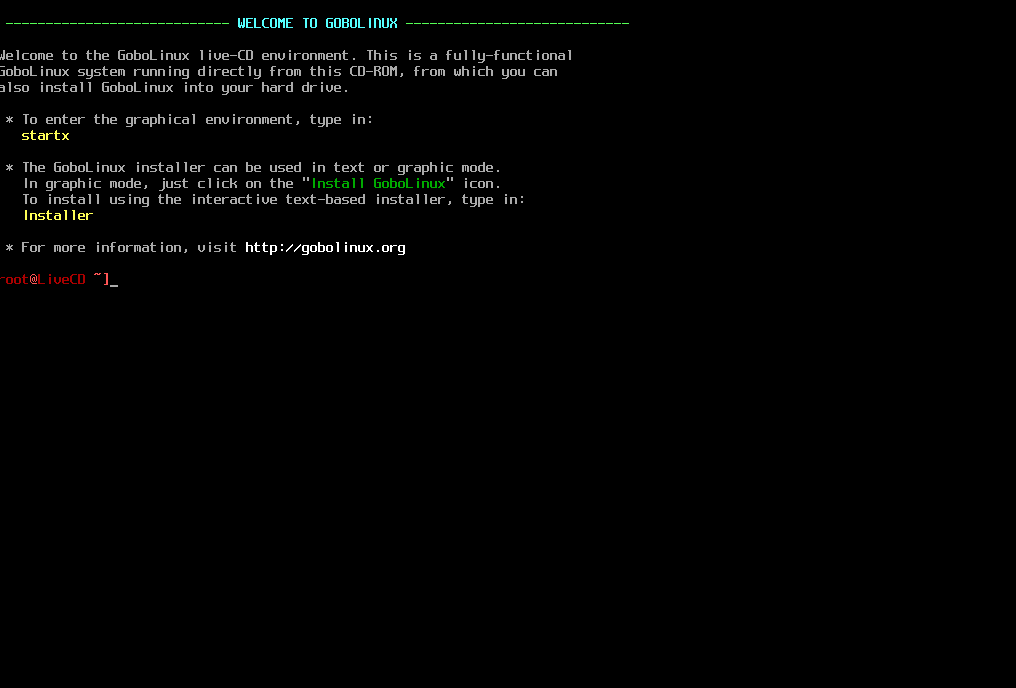
– When you boot up the downloaded ISO file. You will see that it starts as a CLI:
– Then, if you write the startx command. It will start the graphical user interface with the “Awesome” window manager:
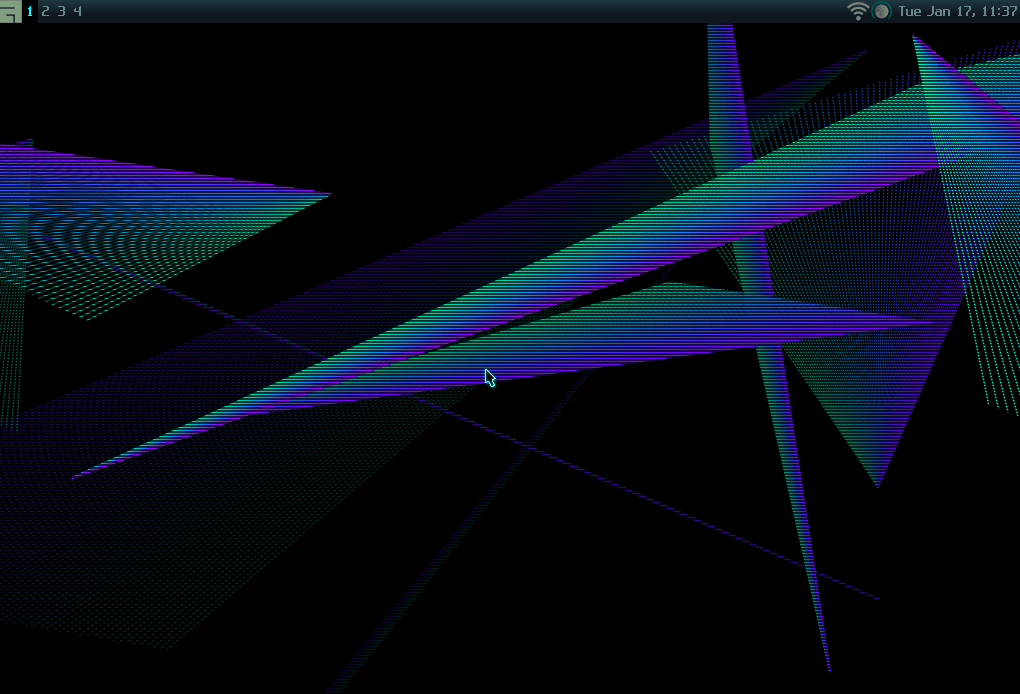
– Personally, I don’t like the default choice of Awesome. It’s a tiling window manager. It’s really hard to use and adapt to. Any normal desktop environment like GNOME, MATE, XFCE or LXDE would have been better. But yea, that’s their decision. You defintly can compile GNOME or XFCE from the source code to install them. But it may take time and effort.
– Although the size of the ISO file is around 1.5 GB, it doesn’t contain much. Just Firefox, GParted, GIMP and some really small software. There’s no graphical text editor, file manager, control center, system monitor or anything else. You are expected to know how to manage the system via the command line. It’s like this by their design[ref]Myths and misconceptions about the design of GoboLinux: https://gobolinux.org/doc/articles/clueless.html [/ref].
– However, there’s a small installer to help you through the installation process, it allows you to choose the installation partition, boot options, language information, user accounts and more:
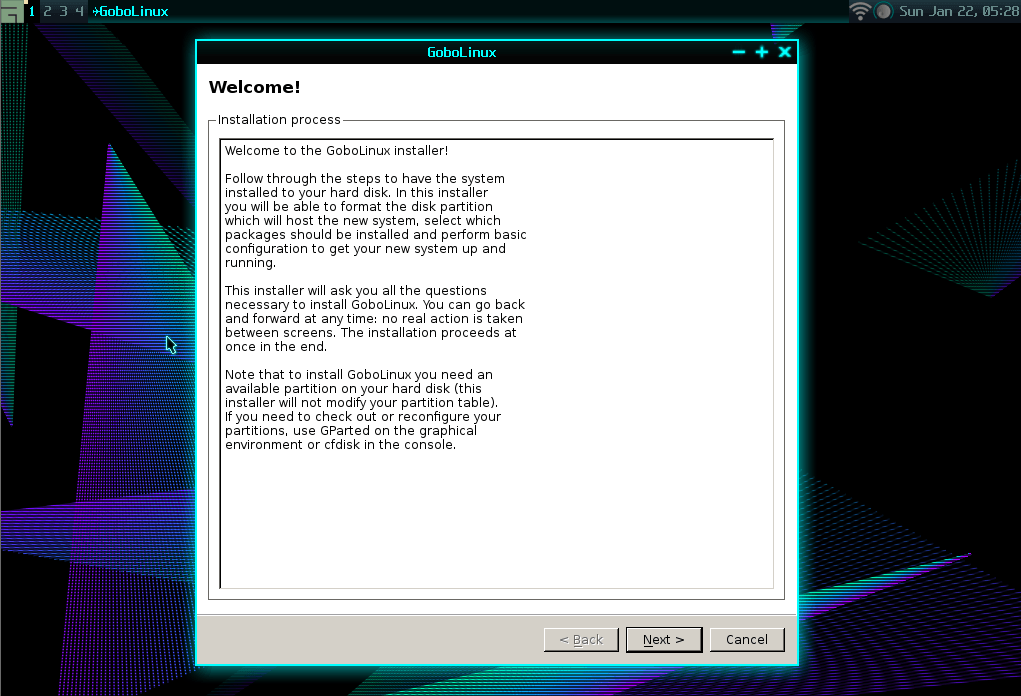

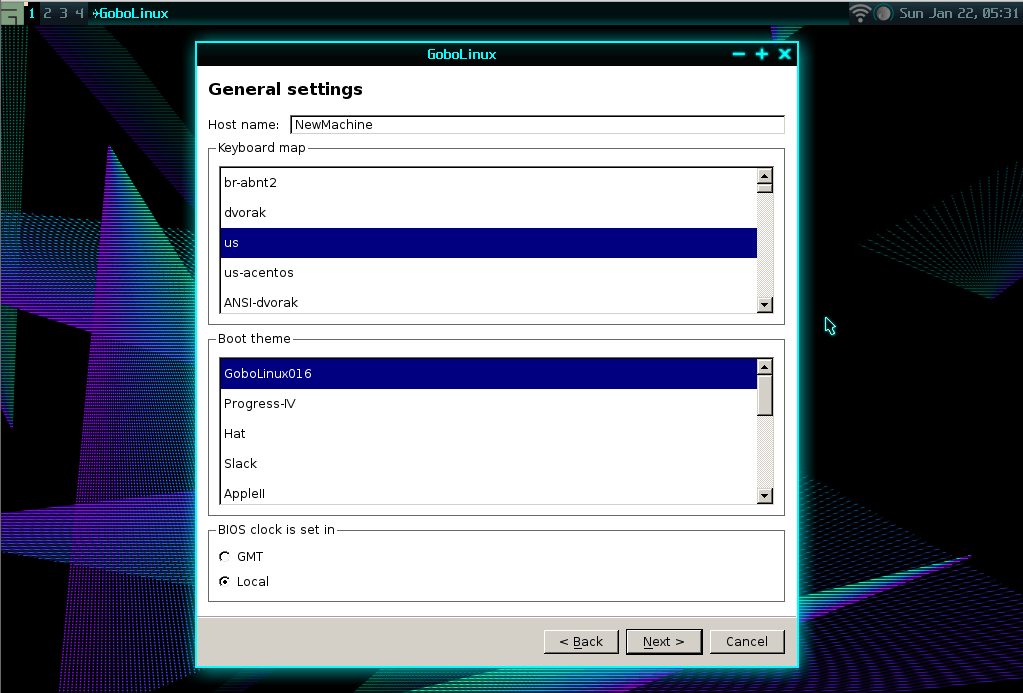
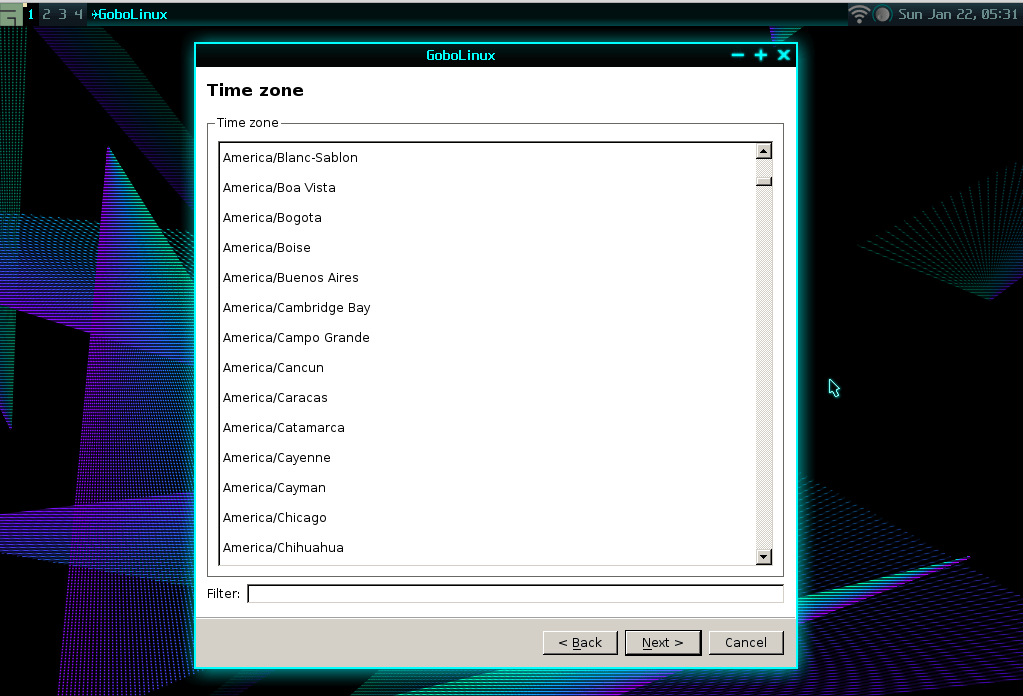

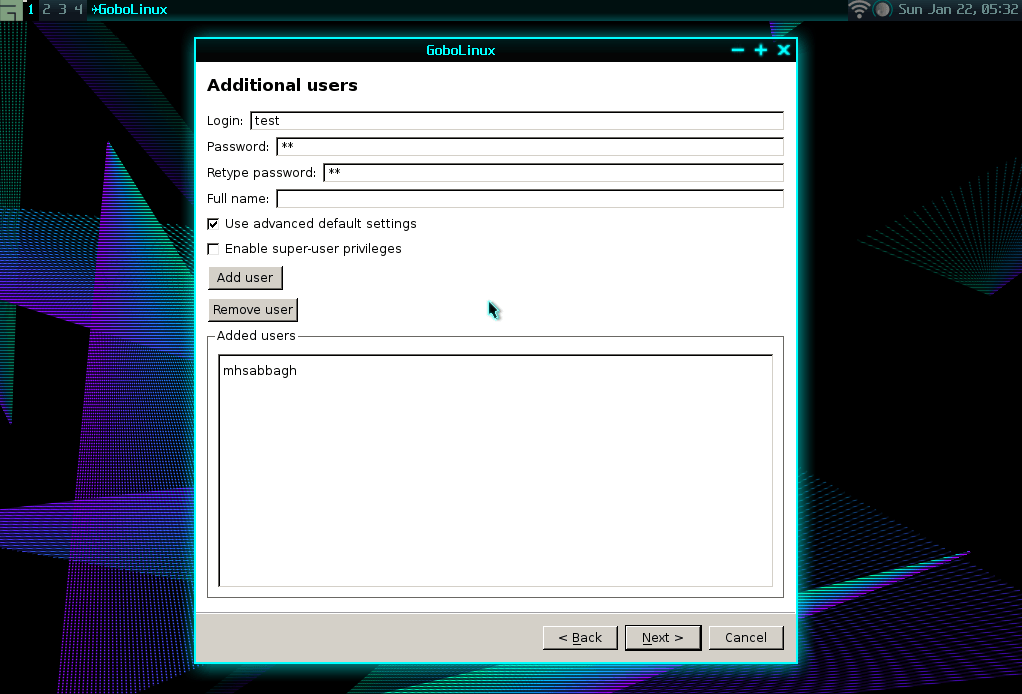
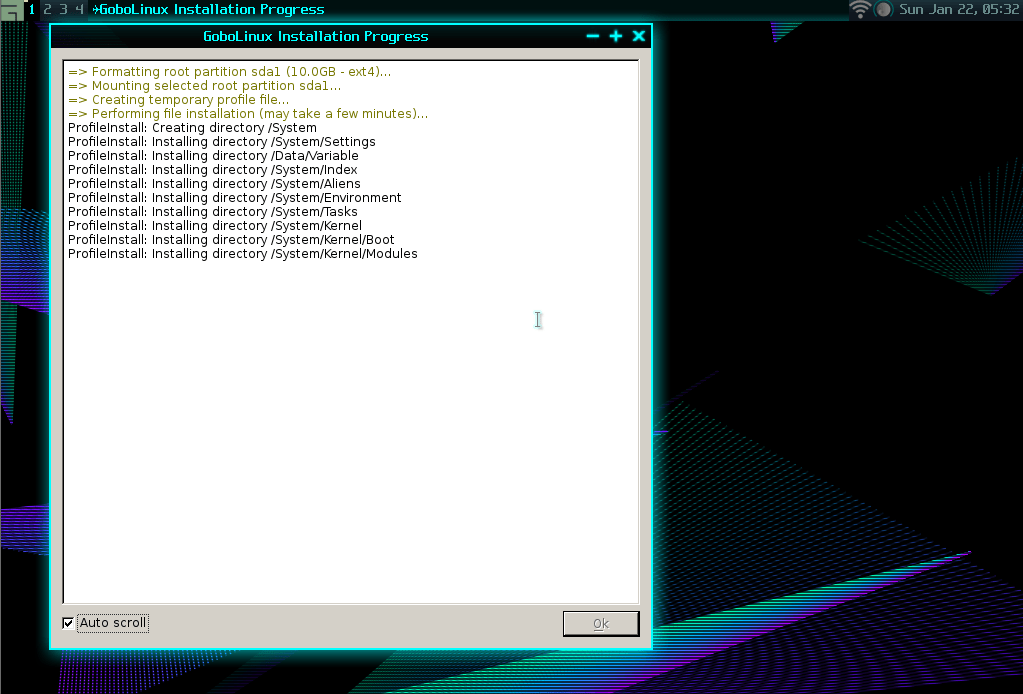
– After the installation, you can simply restart and remove the installation media to start playing with the new system. Since there’s not much graphical applications, there’s nothing else to see.
I have to admit that the filesystem hierarchy is the most beautiful thing in GoboLInux. Not because it’s “easy” or “clean” or anything. But because it combines all the program’s data in a single location where I can see, modify or even delete. I don’t need to navigate from a place to place to reach all the files of a program. And I really like it. It allows you to understand how a program is working on your system and what files it uses to do that.
This is how the filesystem looks like from other Linux distributions:

It also allows you to have multiple version of the same program on your system. 5 +GTK versions for example. You can also choose which version should be default for the system.
This is a small round in the filesystem:
mhsabbagh@NewMachine ~]pwd
/Users/mhsabbagh
mhsabbagh@NewMachine ~]ls
Desktop
mhsabbagh@NewMachine ~]cd /
mhsabbagh@NewMachine /]ls
Data  lost+found  Mount  Programs  System  Users
mhsabbagh@NewMachine /]cd Programs
mhsabbagh@NewMachine /Programs]ls
AbsTK                    GRUB-EFI          NSS
ACL                      GTK+              OpenEXR
Acpid                    GTKMM             OpenLDAP
Adwaita-Icon-Theme       Gutenprint        OpenSSH
ALSA-Lib                 Gzip              OpenSSL
ALSA-Utils               HarfBuzz          ORC
APR                      Hdparm            OS-Prober
APR-Util                 Help2Man          P11-Kit
AsciiDoc                 HiColor-Icons     Pango
ATK                      Hplip             PangoMM
ATKMM                    Htop              Parted
Atool                    IANA-etc          Patch
At-Spi2-ATK              IJS               PCIUtils
At-Spi2-Core             ILMBase           PCRE
ATTR                     ImageMagick       PCSC-Lite
Autoconf                 InetUtils         Perl
Automake                 Installer         Perl-XML-Parser
Avahi                    Intltool          Pinentry
Awesome                  IPRoute2          Pinfo
Babl                     Iptables          PIP
Bash                     KBD               Pixman
BC                       Kerberos          Pkgconfig
BinUtils                 Kmod              Poppler
Bison                    Lame              Popt
Boost                    LCMS              Portmap
BootScripts              Less              PowerTOP
Bzip2                    Lesstif           PPP
CAcerts                  LibAssuan         Procps-NG
Cairo                    LibCap            Psmisc
Cairomm                  LibCroco          PyCairo
CMake                    LibDaemon         PyGObject
Compile                  LibDRM            PyGTK
Compton                  LibEpoxy          PyQt
ConfigTools              LibEvdev          Python
CoreUtils                LibExif           Qpdf
CUPS                     LibFFI            Qt
CUPS-Filters             LibGCrypt         Readline
Curl                     LibGPG-Error      ReiserFSProgs
Cyrus-SASL               LibICU4C          RFKill
DB                       LibIDN            RXVT-Unicode
DBus                     LibJPEG-Turbo     Schroedinger
DBus-GLib                LibMNG            SCons
DejaVu-Fonts-TTF         LibNL             Scripts
DHCPCD                   LibOGG            SDL
Dialog                   LibOpenRAW        Sed
DiffUtils                LibPaper          Serf
Dit                      LibPipeline       SetupTools
Dmidecode                LibPNG            SGML-Common
DocBook-XML-DTD          LibPthread-Stubs  Shadow
DocBook-XSL-Stylesheets  LibRSVG           SIP
DosFSTools               LibSigc++         SPICE-Protocol
E2FSProgs                LibSpiro          SQLite
EFIBootMgr               LibTasn1          Startup-Notification
EFIVar                   LibTheora         Strace
ELFUtils                 LibTIRPC          Subversion
EnhancedSkel             LibTool           Sudo
Eudev                    LibUSB            Sysklogd
Exempi                   LibVA             SYSLINUX
Expat                    LibVDPAU          Sysvinit
FAAD2                    LibVorbis         Tabbedex-URxvt
FAM                      LibXDG-BaseDir    Tar
FFmpeg                   LibXML2           Tcl
File                     LibXSLT           TCPWrappers
FindUtils                Linux             Texinfo
Firefox                  Linux-Firmware    TIFF
Flex                     Linux-Headers     TZData
Fontconfig               Linux-PAM         UnionFS-Fuse
FreeType                 LiveCD            Unzip
Fuse                     Lode-Fonts        Util-Linux
Gawk                     Lsof              Util-macros
GCC                      Lua               Vim
GDBM                     LuaRocks          Wget
GDK-Pixbuf               LVM2              Wireless-Tools
Gegl                     M4                WPA_Supplicant
Gettext                  Make              X264
Ghostscript              Makedepend        XCB-Util-Cursor
Giflib                   Man-DB            XKBcommon
Gimp                     Man-Pages         XMLTO
Git                      Mdadm             Xorg
GLib                     Mesa              Xorg-App
Glibc                    MPC               Xorg-Driver
GLibmm                   MPFR              Xorg-Font
GMP                      Mtail             Xorg-Lib
GnuTLS                   MtDev             Xorg-Proto
GObject-Introspection    Nano              Xorg-Server
GoboHide                 Nasm              XTerm
GoboNet                  NCSA-Mosaic       Xvidcore
GParted                  Ncurses           XZ-Utils
Gperf                    NcursesW          Yasm
GPM                      Nettle            ZLib
Grep                     Net-Tools         ZSH
Groff                    NPth
GRUB                     NSPR
mhsabbagh@NewMachine /Programs]cd Bash
mhsabbagh@NewMachine /Programs/Bash]ls
4.4  Current
mhsabbagh@NewMachine /Programs/Bash]cd 4.4
mhsabbagh@NewMachine /Programs/Bash/4.4]ls
bin  include  lib  Resources  share
mhsabbagh@NewMachine /Programs/Bash/4.4]cd bin
mhsabbagh@NewMachine /Programs/Bash/4.4/bin]ls
bash  bashbug  sh
The Current folder is a symlink for the 4.4 version (because it’s the only one there). You could have had different versions there. As I said before. Everything is combined together. For example if you want to modify how the live CD works, you can simply head to /Programs/LiveCD/ and start playing with the files and scripts.
– To install a program on GoboLinux, you can simply run InstallPackage <program> to install it, or, it if wasn’t available (which is very common), you will have to build it from source code using the Compile command.
– Compile is a simple script that searches for a “recipe” of the program you are looking for on GoboLinux Recipes. A recipe is a small file which tells Compile about the location of the source code on the Internet to download it. Beside some other building options and information to help in the building process. The idea is great: a simple automated tool which does all the compiling job by itself with leaving decisions for you to decide.
– I tried to use it to build Xfce4-terminal. However, the process failed because a dependency for +GTK 3.14 wasn’t available. The complete log can be found here. I tried also to apply it on different recipes but it kept failing. There are a lot of dependencies which do not have a recipe in the database of Compile. Which means you have to download and install them yourself.
However, this is expected, the developers say that it isn’t intended for ordinary users anyway:
GoboLinux was designed focusing the experienced user who doesn’t like things to be automagical. Our scripts merely automate procedures, but they don’t “make decisions”, and whenever they have to, they ask first.[ref]GoboLinux FAQ: https://gobolinux.org/faq.html [/ref]
I couldn’t manage to find a way to install XFCE or GNOME (only building from source is available, and you know how much time it may take). So this really limits using this distribution. If you failed to build your software from scratch, you will really suffer to continue using it.
– Talking about the system in general. It’s fast and light. It takes only 6 seconds to boot on my Lenovo ThinkPad x260. It uses around 90MB of RAM after reaching the graphical desktop.
Conclusion
GoboLinux introduces a lot of new ideas and designs into the Linux distributions world. Things like the filesystem hierarchy and the compiling scripts are amazing examples of what “modernizing” Linux distributions may really mean. However, the distribution wasn’t intended to be “user-friendly” or “ready-out-of-the-box”.
Because of this, it can be said actually that the distribution manages to achieve its goals. An experianced user with a lot of time would definitely enjoy using and tweaking GoboLinux to fit his needs and learn in his way.
GoboLinux
-
Available software
-
Creativity & Inventing
-
Daily Use Purposes
-
Stability & Bugs
-
Customizability
Summary
Introduces a lot of new ideas and technologies into the Linux world. Ready and intended for experienced Linux users.
