

Chrome stops loading a page and shows ERR_QUIC_PROTOCOL_ERROR. Firefox or Safari may open the same address with no trouble.
The fault sits in QUIC, the transport Chrome uses for HTTP/3. Something between your browser and the server broke the handshake. Visitors can clear it with one Chrome flag, and site owners have a short checklist further down.
What Is ERR_QUIC_PROTOCOL_ERROR?
QUIC stands for Quick UDP Internet Connections. Google built it to speed up web traffic, and it runs over UDP port 443 instead of TCP.
When that link fails and Chrome can’t drop back to TCP, the page halts with a message like this: “This site can’t be reached. The webpage at https://example.com/ might be temporarily down or it may have moved permanently to a new web address.”
Chromium tracks it as network error -356, according to SSL Dragon. Edge, Brave, Opera, and Vivaldi share the same networking code, so they can throw it too. Even a de-Googled Chromium build is not immune.
The site itself is rarely down. YouTube and Google tools trigger it more than most, since both moved to QUIC early.
What Causes ERR_QUIC_PROTOCOL_ERROR in Chrome?
Blocked UDP traffic tops the list. Older routers and office firewalls filter UDP on port 443 but leave TCP open, so QUIC packets vanish.
Error only at work, never at home? That points straight at the office firewall.
Extensions come next. Ad blockers, privacy tools, and VPN add-ons grab requests mid-flight. VPN tools cause it most.
Proxy servers expect HTTP or HTTPS over TCP. UDP gets dropped or mangled on the way through.
Deep packet inspection gear can also trip over encrypted UDP. And an old Chrome build may speak a QUIC version the server no longer accepts.
How to Fix ERR_QUIC_PROTOCOL_ERROR
Go through these in order. The first one settles most cases.
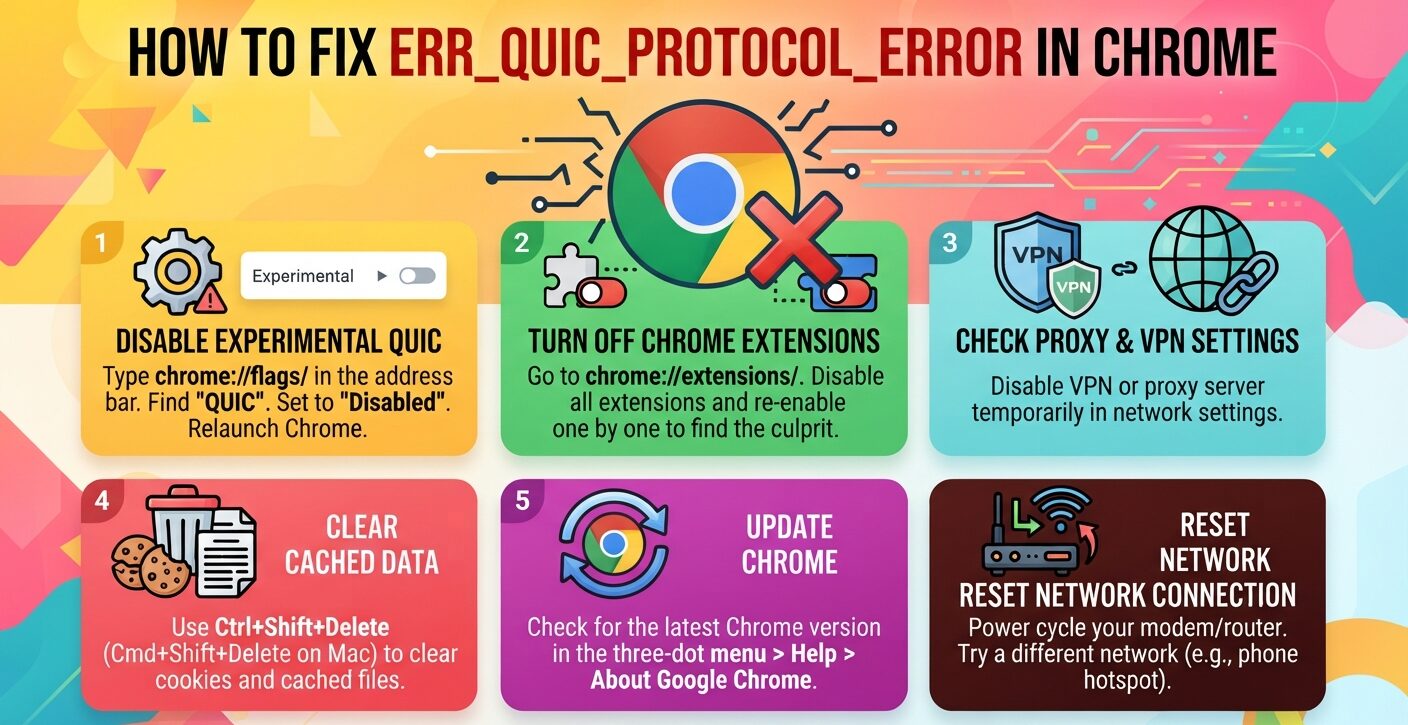
1. Disable the Experimental QUIC Protocol
Type chrome://flags/ in the address bar and search for “quic”. Set Experimental QUIC protocol to Disabled, then press Relaunch.
Chrome now connects over TCP and TLS. You can set the flag back to Default whenever you want.
2. Turn Off Chrome Extensions
Open chrome://extensions/, switch everything off, restart Chrome, and reload the page. Turn add-ons back on one at a time until the error returns.
That last one you enabled is the culprit. It’s also a reminder to vet each extension before you install it.
If a privacy add-on broke things, swap in an alternative from this list of privacy add-ons for Chromium browsers and test again.
3. Check Proxy and VPN Settings
On Windows, go to Internet Options, then Connections, then LAN settings. Clear “Use a proxy server for your LAN” if you never set one up.
Mac users will find the same option under System Preferences, Network, Advanced, Proxies.
Disconnect your VPN and retest. If that fixes it, look for a client with app-level tunneling controls so Chrome can skip the tunnel.
4. Clear Cached Data
Press Ctrl+Shift+Delete, or Cmd+Shift+Delete on a Mac. Pick All time, tick cookies and cached files, and click Clear data.
Stale cache causes other Chrome faults too, ERR_CACHE_MISS among them.
5. Update Chrome
Open the three-dot menu, go to Help, then About Google Chrome, and relaunch after the update.
Builds age fast now. Chrome 153 moved to a two-week release cycle in September 2026, per this Chrome version history.
6. Reset Your Network Connection
Drop Wi-Fi or pull the cable, wait 30 seconds, and reconnect.
Then load the page on a phone hotspot. If it works there, your main network is blocking QUIC.
7. Test Incognito Mode and Security Software
Open a private window with Ctrl+Shift+N or Cmd+Shift+N. A clean load there blames your Chrome profile, not the site.
Still stuck? Pause your antivirus and Windows Firewall for a minute. If pages load, add Chrome as an exception and switch protection back on.
How Site Owners Can Fix ERR_QUIC_PROTOCOL_ERROR
Your site works on your own network, but Chrome visitors can’t reach it. Most of them will leave rather than debug.
Start at the server. Confirm stable HTTP/3 support, with TLS certificates and ALPN values that fit QUIC. HTTP/3 Check can verify from outside, and server logs expose failed handshakes.
Open UDP 443 on firewalls. Many web application firewalls were never set up for UDP on that port.
Review Cloudflare’s HTTP/3 controls or your CDN’s settings, since faulty CDN builds tend to hit by region. Give load balancers session stickiness so QUIC links hold at peak traffic.
Track QUIC failures on their own, because standard HTTP monitoring misses them. Then prove the fallback to HTTP/2 or HTTP/1.1 works across browsers, mobile data, and regions.
Is It Safe to Disable QUIC in Chrome?
Yes. Chrome falls back to TCP with TLS, which keeps your traffic encrypted. DNS Robot describes it as a setup many IT departments run on purpose.
The trade-off is speed. The flag turns HTTP/3 off for every site, so SSL Dragon suggests using it to confirm the cause, then switching it back on once the network issue is gone.
FAQs
What does ERR_QUIC_PROTOCOL_ERROR mean?
Chrome failed to finish a connection over QUIC, the UDP transport behind HTTP/3, and couldn’t fall back to TCP. The website is usually online. The block sits in the browser, the network, or the server setup.
How do I fix ERR_QUIC_PROTOCOL_ERROR on YouTube?
Open chrome://flags, search “quic”, set Experimental QUIC protocol to Disabled, and relaunch. If YouTube still fails, turn off extensions and your VPN, then clear cached data.
Why does ERR_QUIC_PROTOCOL_ERROR appear on my work network only?
Office firewalls often block UDP port 443, which QUIC needs, while TCP 443 stays open. Ask IT to allow outbound UDP 443, or disable QUIC in Chrome flags.
What should I test before asking Reddit about ERR_QUIC_PROTOCOL_ERROR?
Disable QUIC in chrome://flags, try an Incognito window, and load the page on a phone hotspot. Post those results, your Chrome version, and any VPN or extension so Reddit users can narrow down the cause.
Why do I get ERR_QUIC_PROTOCOL_ERROR on Reddit?
A blocked or broken QUIC connection, same as on any other site. Disable QUIC in chrome://flags, turn off extensions, and check proxy or VPN settings. If Reddit opens in Firefox, the fault is on the Chrome side.
