

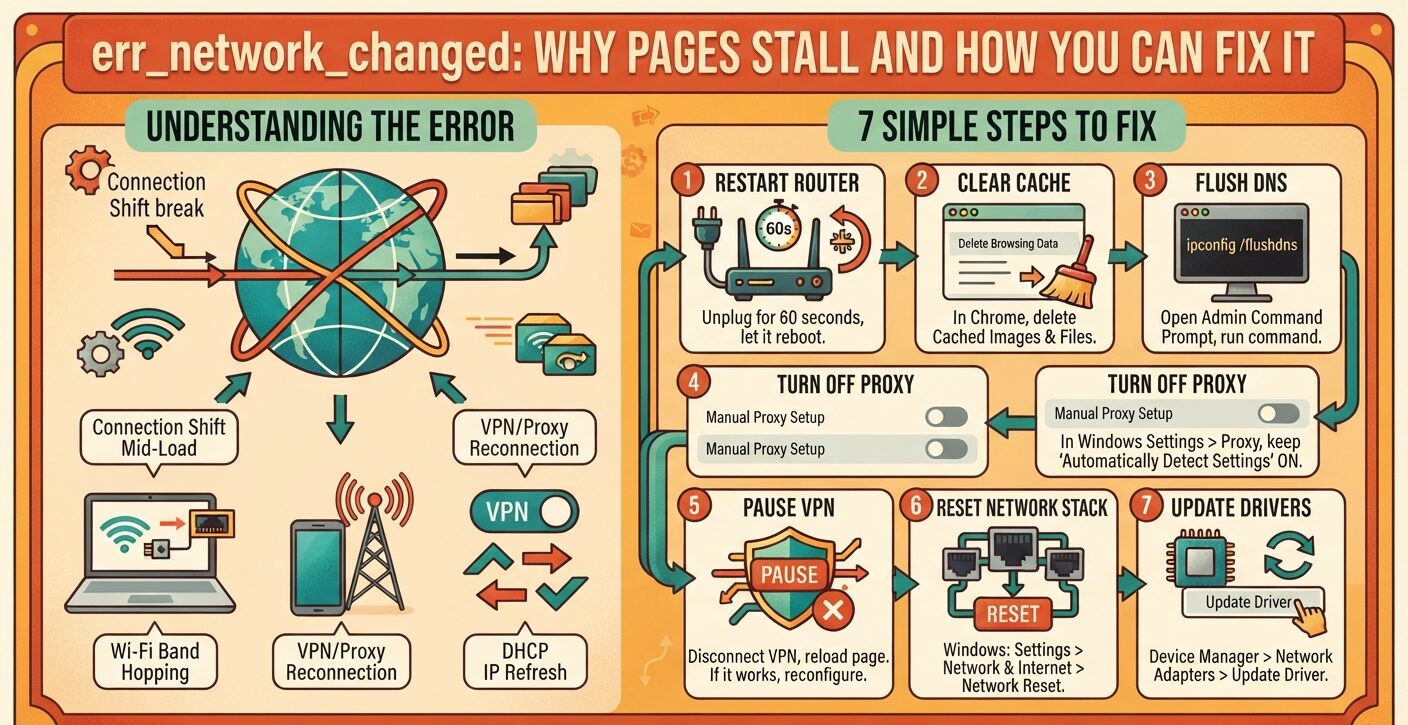
You click a link, and Chrome stops with err_network_changed. The site is not down. Your own connection shifted while the page loaded, so the browser dropped the request instead of finishing it on a new path.
A Wi-Fi reconnect, a VPN toggle or a fresh IP address can set it off. The fixes below start simple and need no tech background.
What err_network_changed Means When Chrome Shows It
Chrome prints two lines above the code: “Your connection was interrupted” and “A network change was detected.” Both describe one event. The link your browser used at the start of a request changed before the request ended.
Chromium’s network error list files the code as error -21, in the block kept for system errors. Put simply, Chrome cancels its own request. No server turned you away.
In most cases you are still online. Picture a phone call where someone swaps the SIM mid-sentence. The handset still shows bars, yet the call drops. If Chrome says you have no link at all, that is a separate fault covered in this guide to net::err_internet_disconnected.
Why “A Network Change Was Detected” Keeps Popping Up
No single fault causes err_network_changed. It appears whenever the path between your device and a site shifts mid-load.
Hopping between links is the top trigger. A laptop that moves between 2.4 GHz and 5 GHz bands, or from Wi-Fi to a cable, breaks any page in progress. Band steering on newer routers does this on its own. Even half a second without signal is enough.
IP address changes cause plenty of cases. A DHCP lease renews, or two devices claim one address, and the old session stops matching.
DNS trouble plays a part too. A slow resolver, a stale cache or a provider outage can all break lookups. When a name fails to resolve at all, Chrome shows a different code, explained in our walkthrough of ERR_NAME_NOT_RESOLVED in Chrome.
VPNs and proxies reroute traffic. When a tunnel reconnects or its rules change, the request in flight dies. Router reboots, firmware installs and a laptop waking from sleep do the same.
Security tools can also cut the link. Some ad blockers and antivirus suites grab requests and drop them while they update. Suites that scan HTTPS traffic may raise certificate authority warnings instead.
Chrome, Edge and Other Browsers That Show err_network_changed
The code comes from the Chromium engine. Google Chrome, Microsoft Edge, Opera and Brave all print the same text. The error page follows each brand’s look, and that is the whole difference.
Firefox and Safari word the message their own way, but the causes match. A page that loads blank with no message is another problem, described in this piece on blank pages and net::err_empty_response.
How to Fix err_network_changed in 7 Steps
Start at step 1. Move down the list only while the error stays.
1. Restart the Router and Check the Signal
Unplug the router, wait about a minute, then plug it back in. Let it finish booting before you test.
On weak Wi-Fi, sit closer or plug in an Ethernet cable. On a phone hotspot, switch airplane mode on and off. Then reload the page.
2. Clear Cached Images and Files
Stale cached files can clash with fresh requests. In Chrome, open Settings, then Privacy and Security, then Delete Browsing Data.
Set the range to All time and tick Cached Images and Files. Add cookies for a deeper clean, but keep saved passwords unless you store them elsewhere. The same step clears Chrome’s ERR_CACHE_MISS prompt.
3. Flush DNS and Switch Resolvers
On Windows, open Command Prompt as administrator and run ipconfig /flushdns to wipe old lookups.
In Windows 11, go to Settings, then Network & Internet, pick your connection and open View Additional Properties. Next to DNS Server Assignment, click Edit. Set it to Manual, turn on IPv4, and enter 8.8.8.8 as preferred and 8.8.4.4 as alternate. Save, then reconnect.
4. Turn Off Stray Proxy Settings
Some apps and VPNs add proxy entries without asking. In Windows 11, open Settings, Network & Internet, then Proxy.
Keep Automatically Detect Settings on and Manual Proxy Setup off. Restart the browser and try again.
5. Pause or Reconfigure Your VPN
Switch the VPN off and reload. If the page opens, the VPN setup is the cause.
Pick another server and update the app, since old builds can clash with newer systems. Linux users after a steadier client can compare these VPN providers with native Linux apps.
Where your VPN offers split tunneling, check that the browser isn’t sent down a faulty tunnel. Support varies by platform, as this rundown of Linux VPN client features shows.
6. Reset the Network Stack
Over months, Winsock, TCP/IP and adapter settings collect bad entries. In Windows 11, open Settings, Network & Internet, Advanced Network Settings, then Network Reset. Click Reset Now and confirm.
macOS has no reset button. Open System Settings, go to Network, remove your active connection with the minus button, add it back with the plus button, and rejoin.
7. Update or Reinstall the Network Adapter Driver
Old or broken drivers make links shaky. Right-click Start, open Device Manager and expand Network Adapters.
Right-click your active adapter, choose Update Driver, then Search Automatically for Drivers. Still stuck? Uninstall the device and reboot. Windows puts the driver back on startup.
When err_network_changed Returns on a Wired PC
Some people hit the error on a desktop plugged into Ethernet. One case on Microsoft Q&A showed the Wi-Fi adapter flipping between connecting and secured several times every few seconds. The cable link stayed up the whole time.
Each flip counts as a network change. A network reset cleared it for a while, then the fault came back. Turning Wi-Fi off while wired stopped the errors.
If your PC has both adapters, disable the one you don’t use. And if Chrome now shows a different code, such as a QUIC error, you are dealing with a new fault. See how to fix ERR_QUIC_PROTOCOL_ERROR for that one.
FAQs
Does err_network_changed mean my internet is down?
No. It means your connection changed while a page was loading. Your internet still works in most cases, and a reload often brings the page back.
Can a VPN cause err_network_changed?
Yes. A VPN that reconnects, swaps servers or rewrites routing rules moves your traffic to a new path. Any request in flight fails. Turn the VPN off and reload to confirm.
Why does err_network_changed keep happening?
Repeat errors point to a link that keeps shifting: Wi-Fi hopping between bands, an adapter cycling on and off, a flaky VPN or DHCP address changes. Fix the unstable piece instead of reloading.
Is Reddit down when it shows err_network_changed?
No. The code comes from your own connection, not Reddit’s servers. If Reddit loads on mobile data but fails on Wi-Fi, the fault sits in your home network, router or VPN.
Should I trust Reddit fixes for err_network_changed?
Test Reddit tips one at a time and match each to a cause. Start with a router restart and a VPN check before you reset the network stack or reinstall drivers.
