

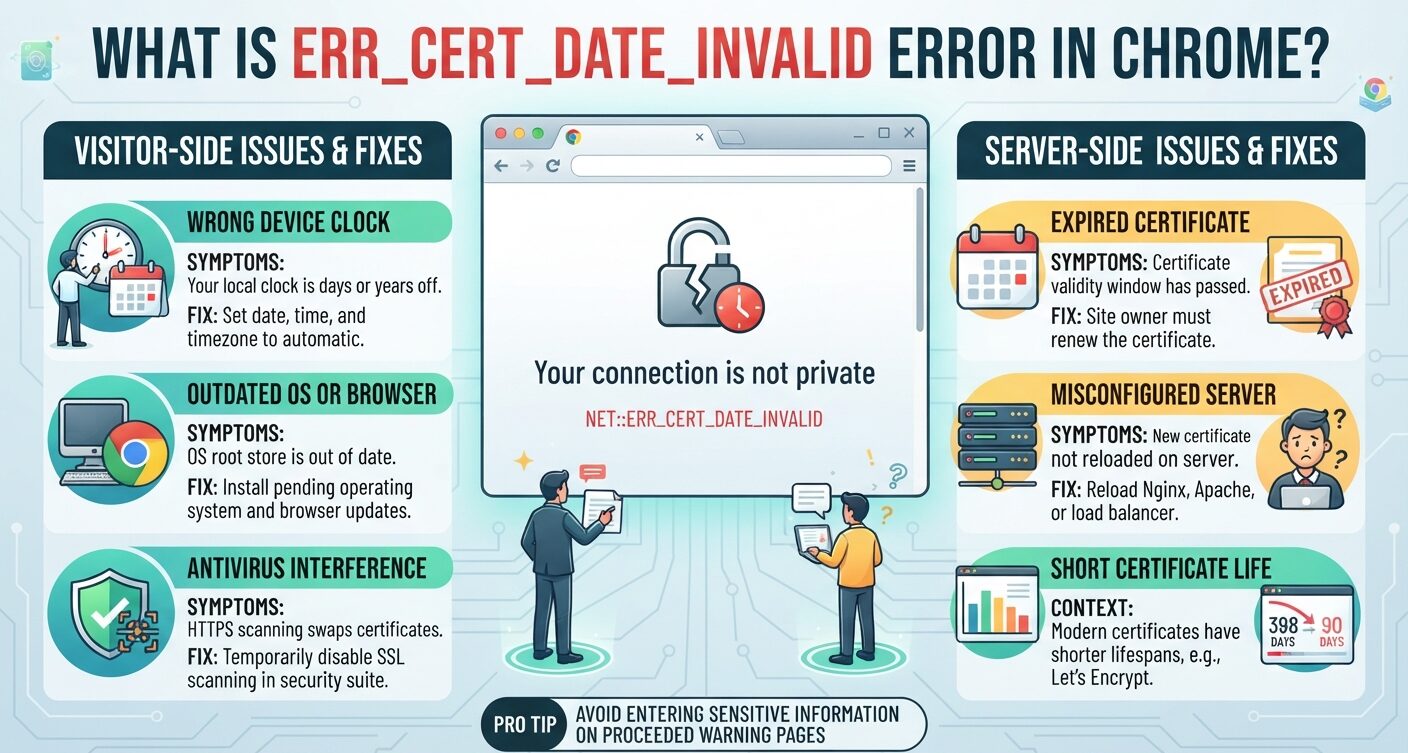
Chrome shows err_cert_date_invalid when the current time falls outside a site’s SSL certificate dates. The certificate has expired, or its start date hasn’t arrived yet.
Sometimes neither is true, and the device clock is wrong. That split decides the fix. A visitor can correct a clock in a minute. An expired certificate needs the site owner to renew it and reload the server.
What err_cert_date_invalid Means in Chrome
Every X.509 certificate carries two timestamps, notBefore and notAfter, defined in RFC 5280. Chrome checks that the present moment sits between them before it finishes the TLS handshake.
If that check fails, the connection stops. It stops even with a trusted issuer and a matching hostname. The end date is there on purpose: an old certificate’s private key may have leaked, and expiry caps that risk.
The “present moment” comes from your device. Chrome keeps no separate time source. A clock that is days or years off will reject certificates the rest of the world accepts.
How the Warning Reads Across Browsers
Chrome and Edge print NET::ERR_CERT_DATE_INVALID under a “Your connection is not private” page. Some builds say “The certificate is not yet valid” when the start date lies in the future.
Firefox uses SEC_ERROR_EXPIRED_CERTIFICATE for the same fault. Chrome’s exact wording shifts between builds, which its version-by-version release timeline makes easy to follow.
Does err_cert_date_invalid Always Mean an Expired Certificate?
No. The error fires at either end of the validity window. Expiry is the common case.
A “not yet valid” certificate appears when a server clock lags, or when someone installs a certificate before its start date.
The fastest test: open the site on a second device, on a different network. One device failing points at its clock. Every device failing points at the certificate.
What Triggers NET::ERR_CERT_DATE_INVALID on Devices and Servers
On the Visitor’s Device
A wrong date, time, or time zone tops the list. Travel across zones causes it. So does a dying CMOS battery, which resets the PC clock at every boot.
Antivirus suites and company proxies that scan HTTPS swap in their own certificate. If that substitute has lapsed, Chrome flags it.
An old operating system can also misread modern certificate chains, because its trust store is out of date.
On the Web Server
Nobody renewed the certificate, so it lapsed for every visitor at the same moment.
Or renewal wrote a new file to disk, but nobody reloaded the server. Auto-renewal can fail without a sound: an expired ACME account, a failed HTTP or DNS challenge, or a cron job that quit.
Behind a load balancer, only some nodes may hold the new copy, so the error comes and goes. A web application firewall or reverse proxy that terminates TLS can hold its own stale copy too.
Fixing err_cert_date_invalid in Chrome: 4 Steps for Visitors
1. Set Date, Time, and Time Zone to Automatic
On Windows, open Settings, then Time & language, then Date & time. Turn on automatic time and time zone, then click Sync now.
On macOS, open System Settings, then General, then Date & Time, and enable the automatic option. Close Chrome fully and reopen it, since it may remember the failed check.
2. Read the Certificate’s Real Dates
Click “Not secure” in the address bar and open the certificate. Compare the “Valid to” date with today. If it has passed and your clock is right, only the site owner can fix it.
3. Turn Off HTTPS Scanning and Test Extensions
Switch off HTTPS or SSL scanning in your security suite, then reload. Next, try the page in Incognito, where extensions stay off.
A clean load there means an add-on is interfering. A short list of vetted privacy add-ons for Chromium browsers causes fewer conflicts than a crowded toolbar.
4. Clear SSL State and Install Updates
On Windows, open Internet Options, go to the Content tab, and press Clear SSL state. Then install any pending OS updates to refresh the root certificate store.
Server-Side Fixes for an Expired Certificate
Check What the Server Actually Sends
Test the certificate the server hands out, not the file on disk:
echo | openssl s_client -connect example.com:443 -servername example.com 2>/dev/null | openssl x509 -noout -datesA notAfter date earlier than today confirms expiry. If the terminal is new to you, these Linux command line basics cover what you need.
A fresh file on disk paired with a stale served certificate means someone skipped the reload.
Renew, Then Reload
certbot renew --quiet
systemctl reload nginx
Skip the reload and visitors see no change. Certbot’s default install moved to a Snap package, so check its systemd timer as well as any old cron entry.
Then confirm your ACME account status and challenges, and push the new certificate to every load-balanced node.
Short certificate lives are the reason these checks matter. Public TLS certificates have been capped at 398 days since 2020, down from several years. Let’s Encrypt issues 90-day certificates to push owners toward automated renewal.
ERR_CERT_DATE_INVALID vs Other Chrome Certificate Errors
Chrome runs four separate checks on each certificate. A failure in each one has its own cause and its own fix.
| Error | Check that failed | Usual cause | Fixed by |
|---|---|---|---|
| ERR_CERT_DATE_INVALID | Validity dates | Expired certificate or wrong local clock | Admin renews, or visitor fixes clock |
| ERR_CERT_AUTHORITY_INVALID | Issuer trust | Self-signed certificate, missing chain, private CA | Admin installs full chain from a trusted CA |
| ERR_CERT_COMMON_NAME_INVALID | Hostname | Certificate does not list this hostname | Admin issues one that names it |
| ERR_SSL_VERSION_OR_CIPHER_MISMATCH | Handshake | Old TLS version or no shared cipher | Admin enables current TLS and ciphers |
When the dates check out but the hostname doesn’t, see this guide to ERR_CERT_COMMON_NAME_INVALID in Chrome.
An untrusted signer is a separate problem, explained in the NET::ERR_CERT_AUTHORITY_INVALID breakdown.
Is It Safe to Click Past err_cert_date_invalid?
Only on a page where you type nothing. Chrome lets you click Advanced, then Proceed.
The traffic stays encrypted, but encryption protecting data in transit is only as sound as the key behind it. After expiry, Chrome can’t vouch for that key.
Never enter passwords or card details on a page reached that way. FOSS Post’s privacy and security series covers safer habits.
Catching Certificate Expiry 30 Days Before Visitors Do
Expiry is an outage you can see coming months ahead. The site works until the final second. Then every visitor meets a full-page warning.
Standard uptime checks miss it, because the server keeps responding. Watch expiry dates themselves, with alerts by email, SMS, Slack, Telegram, or webhook weeks in advance.
Schedule renewal around 30 days before expiry. On a 90-day Let’s Encrypt certificate, that leaves a 30-day window to spot and retry a failed attempt.
FAQs
What does NET::ERR_CERT_DATE_INVALID mean?
It means the time on your device falls outside the site certificate’s valid dates. The certificate has expired, isn’t valid yet, or your clock is wrong.
How do I fix err_cert_date_invalid on Android?
Open Settings, then Date & time, and turn on automatic date, time, and time zone. Restart Chrome and reload. If other devices fail too, the site’s certificate has expired.
Can a dead CMOS battery cause err_cert_date_invalid?
Yes. A failing CMOS battery resets the PC clock at each boot, often to an old year. Chrome then treats valid certificates as out of date. A new CR2032 battery fixes it.
Is it safe to bypass err_cert_date_invalid on Reddit?
Not if you plan to log in. A large site like Reddit rarely lets its certificate lapse, so the warning points to your clock, antivirus scanning, or a proxy. Fix those first.
Why do Reddit and every other site show err_cert_date_invalid at once?
When every HTTPS site fails together, the fault sits on your device. Check the system clock and time zone first, then any antivirus that scans HTTPS traffic.
