

Xubuntu 20.04 LTS
-
Available software
-
Creativity & Inventing
-
Daily Use Purposes
-
Stability & Bugs
-
Customizability
Summary
Xubuntu 20.04 added some noticeable features, and its adaptation of Xfce 4.14 and the switch to GTK3 is very enhancing for the overall user experience. There are some bugs and issues, but for many users, they are not affected by them.
One of the most gorgeous flavors of Ubuntu is Xubuntu, which is shipped by default with the Xfce desktop. Xfce is a very practical desktop environment that not only “just works”, but is also beautiful in its own characteristic way.
Xubuntu 20.04 is the first LTS release to ship with Xfce 4.14, making it also the first LTS to fully experience the power of GTK 3 after it was imported from GTK 2 taking around 4 years of continuous work. The amounts of updates between Xubuntu 18.04 and 20.04 is huge.
We’ll take you today in a tour in Xubuntu 20.04, what are its features and what bugs or issues you may face if you consider switching to it.
This post is part of a longer series of detailed reviews published by FOSS Post about all the Ubuntu 20.04 flavors. Here are they so far (including the one you read now):
Xubuntu 20.04 LTS Review
Desktop & Appearance
Here’s how the default Xubuntu 20.04 desktop looks like:

A traditional Xfce desktop with a panel and desktop icons.
There’s some interest in eyecandy in Xubuntu, the selection of icon & GTK themes is a nice combo:

The default terminal appearance looks gorgeous too:

However, one will notice that the default panel layout does not include a workspace switcher:

Of course, it can be added in few seconds nonetheless, but its existence by default could’ve been better for new users:

One of the nice features I discovered is that the power applet on the panel shows you the battery percentage of other components in your PC other than just the battery. For example, it supports my WiFi keyboard:

Xubuntu 20.04 adds dark theme support (For the Greybird theme), here’s how it looks like:

The famous Numix theme is also shipped there by default:

A nice set of default wallpapers is included too:

As an additional addon (From a 3rd-party), you can install this “MacBird” theme for xfwm4 to make your window controls look like macOS:

Menus and sub-menus in the Greybird theme are very beautiful, especially if combined with windows using the MacBird theme above:

Settings & Options
The application launcher in Xfce is just like it ever was:

However, this time there are some new options for it in Xfce 4.14. You can for example choose to change the display layout for it:

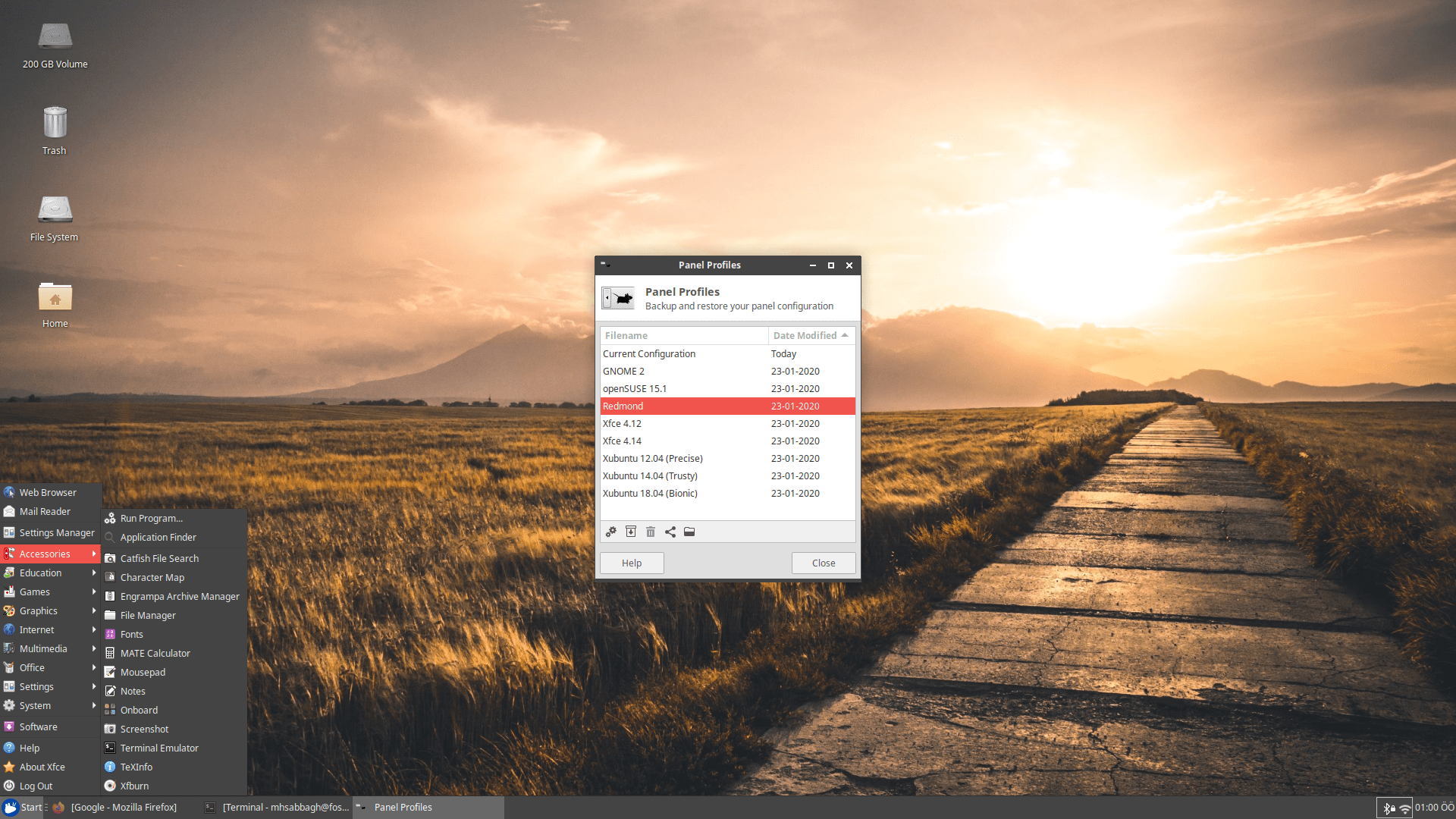
There’s a small app for changing the layout of the Xfce desktop in Xubuntu. It can be used to instantly change it into many pre-defined layouts:

Here’s how the Redmond one looks like:
One of the new features in Xfce 4.14 is window grouping; Your Xfce panel now displays the number of opened windows of the same type:

Xfce still doesn’t support HiDPI with fractional scaling sadly.
Software Management
Xubuntu 20.04 comes with GNOME Software by default to allow users install the programs they want:
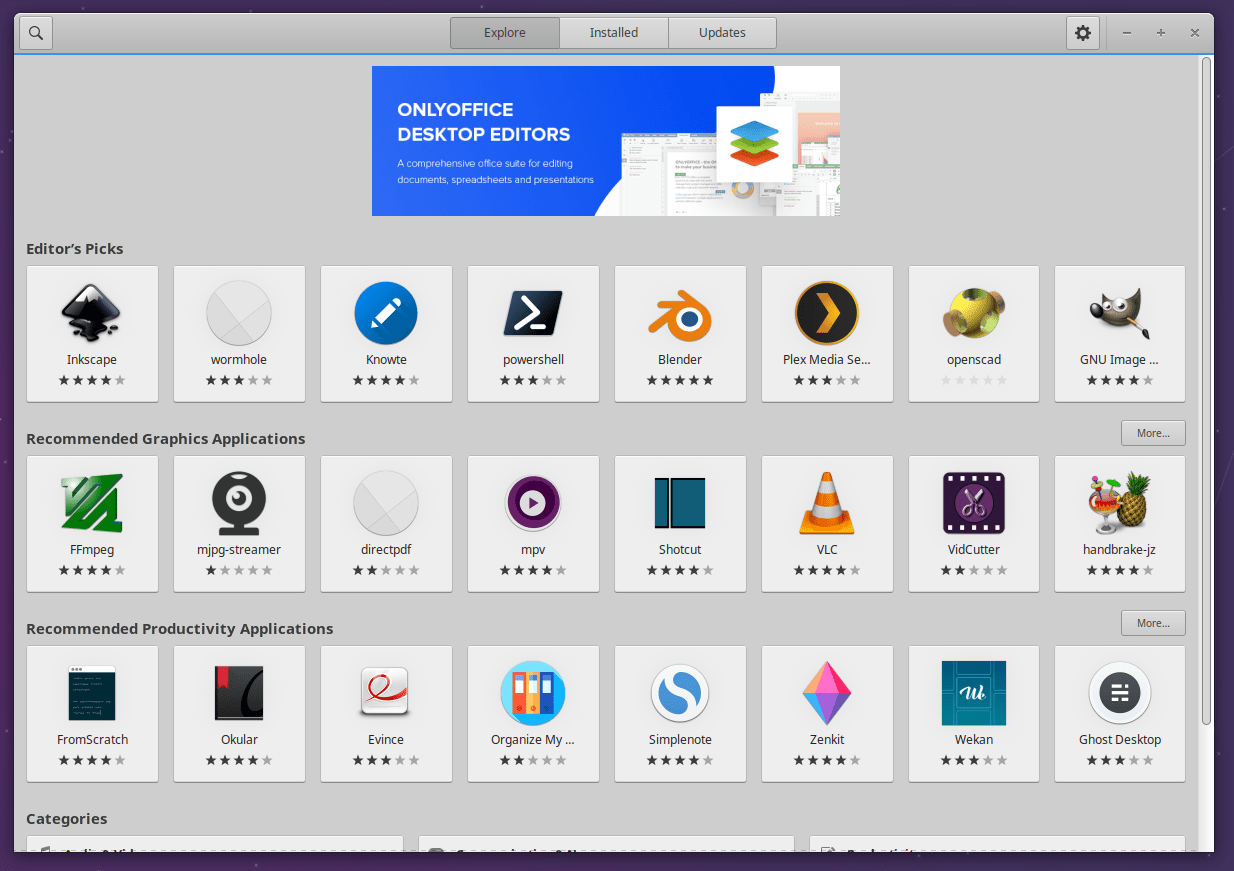
While GNOME Software is installed on many other Linux distributions as well – including the parent Ubuntu where it was forked into Ubuntu Software – it wasn’t a wise option to include in Xubuntu 20.04 by default, as it has been historically known to be poor in software management in general. The number of daily user complaints of GNOME Software – if you have been following online support forums and groups – has been mind blowing.
In our experience, we tried to install Inkscape, but immediately got this error message after trying to install it again (As the first didn’t work):

The progress bar shows everything, except progress:

What was more hilarious than that is that Inkscape was immediately listed in the list of installed applications, but with an option to “install” it:

The funny thing is that if you click the install button, it asks you about whether you want to remove it?

Not sure whether it was mistakenly made to be like that or whether someone was trying to troll the poor users.
In any case, these issues, of course, are not caused by the Xubuntu development. GNOME Software in most Ubuntu derivatives comes with the Snap plugin and its development is not part of Xubuntu. However, since this has been the situation of the quality of that software, regardless of who’s to blame, then the development team should have made the decision of not including it by default, just like what the Ubuntu MATE team did and made their own solution instead.
Shipping another software manager or maybe Synaptic could’ve been a better option.
Possible Bugs and Issues
AMD users should be very careful from Xfce 4.14.
There’s a known bug in it that causes screen glitches and tearing to an unbearable level. The official Xubuntu Twitter account talked about it, with a possible workaround:
However, here with AMD RX580 graphics card and AMD Ryzen 1600 CPU, we had no such issue with Xubuntu 20.04. All is good here.
Weirdly, though, we had it with Xfce 4.14 on other Linux distributions. And what’s weird about it is that it only affects Xfce, not the other desktop environments. So it looks like it is something broken from that side.
Additionally, placing windows near each other is difficult in Xubuntu. Windows get forced to stick to the edges of the screen or other windows close to it. The solution was simply to disable windows snapping:

Finally, a well-known bug exists when trying to resize the windows of various applications. The mouse pointer responsible for that is activated in a very small area in the corner of the window, making it very hard to do the resize operation. Possible solutions and workarounds exist in the Xubuntu website.
Performance
Xubuntu 20.04 boots in 7-8 seconds:
mhsabbagh@fosspost:~$ systemd-analyze
Startup finished in 5.614s (kernel) + 7.816s (userspace) = 13.431s
graphical.target reached after 7.811s in userspace
And uses 726MB of RAM after a fresh boot:
mhsabbagh@fosspost:~$ free -m
     total used free shared buff/cache available
Mem: 16004 726 14647 2 630 15001
Swap: 1768 0 1768
Should you Upgrade to Xubuntu 20.04?
The short answer is not now.
There are many quirks and small issues as you can see. So it would be a much wiser option to wait for the 20.04.1 release which is going to be released in July. It is expected that many bugs and issues will get fixed by that time.
However, if none if these bugs affect you or if you are an experienced Linux user who can solve his/her issues by himself/herself, then go for it.
Users considering Xubuntu 20.04 for a new fresh install should keep in mind the issue related with AMD hardware and the other ones mentioned here. Other than that, Xubuntu 20.04 is your expected Linux distribution which can be depended upon to be your daily driver as it ever was.
The Bottom Line
Xubuntu 20.04 added some noticeable features, and its adaptation of Xfce 4.14 and the switch to GTK3 is very enhancing for the overall user experience.
However, some issues and bugs exist in it as well. This isn’t to tell you not to try Xubuntu 20.04, but rather, to just wait few weeks to get the 20.04.1 release. Or, if you would like, you can go ahead and start using it from now if these bugs don’t affect you.
In fact, except for the AMD drivers bug, most of them are minor bugs and notices that only concern absolutely new Linux users. But for many other users, they would be just fine with Xubuntu 20.04.
Xfce 4.14 continuous to be an excellent desktop environment that preserves the overall user experience and feeling over the years. It is an invaluable addition to the Linux desktop.
You can go ahead in downloading Xubuntu 20.04 from its official website.
Xubuntu 20.04 LTS
-
Available software
-
Creativity & Inventing
-
Daily Use Purposes
-
Stability & Bugs
-
Customizability
Summary
Xubuntu 20.04 added some noticeable features, and its adaptation of Xfce 4.14 and the switch to GTK3 is very enhancing for the overall user experience. There are some bugs and issues, but for many users, they are not affected by them.
